

Remember the days when a LinkedIn post was just a block of text and maybe a grainy photo of a corporate handshake? If you tried that today, you’d be shouting into a very empty room. In 2026, the LinkedIn feed has transformed into a high-octane visual magazine, and the “Document Post”—better known as the carousel—is the undisputed king of the hill.
If you’ve noticed your favorite industry leaders posting swipeable slides instead of long-winded essays, there’s a mechanical reason for it. A well-executed linkedin carousel strategy does something a standard text post can’t: it forces the user to stop, commit, and interact.
In a world where attention is the scarcest resource, carousels are the ultimate tool for increasing linkedin engagement, boosting dwell time, and turning passive scrollers into active leads. But simply “having” a carousel isn’t enough anymore. As the platform becomes more crowded, you need a strategy that balances psychological triggers with algorithmic favor.
What Are LinkedIn Carousel Posts?
Strictly speaking, LinkedIn doesn’t have a dedicated “carousel” button. Instead, savvy creators use the “Add a Document” feature. By uploading a PDF file, LinkedIn converts each page into a swipeable slide.
These linkedin carousel posts (or linkedin document posts) are the perfect marriage of educational content and visual storytelling. They allow you to break down complex B2B topics—which usually require a 1,000-word whitepaper—into 10 easy-to-digest slides.
Whether it’s a “how-to” guide, a list of industry trends, or a personal brand story, carousels provide a structured narrative. They take the user on a journey from a compelling hook on slide one to a definitive call to action (CTA) on the final slide.
Why LinkedIn Carousel Posts Increase Engagement
Why does the algorithm seem to have a love affair with carousels? It’s not just because they look pretty. It’s because of a metric called Dwell Time.
The Psychology of the Swipe
When a user swipes through a carousel, they are signaling to LinkedIn that the content is worth their time. Each swipe is a micro-conversion.
1. Increased Retention: Users are more likely to finish a 10-slide carousel than read a 10-paragraph post.
2. Algorithmic Rewards: LinkedIn’s algorithm tracks how long a user stays on a post. Carousels naturally keep users on the platform longer, which is exactly what LinkedIn wants.
3. Multiple Interactions: A single user might “swipe” ten times. While this isn’t the same as ten “likes,” the algorithm interprets this high audience engagement as a sign of quality.
According to 2026 engagement benchmarks, carousels generate roughly 5x more reach and 3x more clicks than any other static content format on the platform.
How the LinkedIn Algorithm Treats Carousel Posts
To win at the linkedin carousel strategy, you have to understand how the platform’s “Interest-Based Ranking” works. In 2026, LinkedIn isn’t just showing your content to your followers; it’s showing it to people who have demonstrated an interest in your specific niche.
When you upload a document carousel, the algorithm looks at three specific signals:
1. The “Bounce” Rate: Do people swipe to the second slide, or do they scroll past? This is why your first slide (the hook) is the most important part of the design.
2. Completion Rate: Did the user make it to the end? If 80% of users reach slide 10, LinkedIn will aggressively push that post into the “Recommended for You” feeds of non-followers.
3. Saves and Shares: Because carousels are often educational, they are “saved” at a much higher rate than text posts. On LinkedIn, a “Save” is a massive authority signal—it tells the algorithm that your content is high-value reference material.
If you’re curious about how this fits into the broader picture of platform updates, you should check out our deep dive on the LinkedIn Algorithm Explained to see how reach is calculated this year.
Best Types of LinkedIn Carousel Content
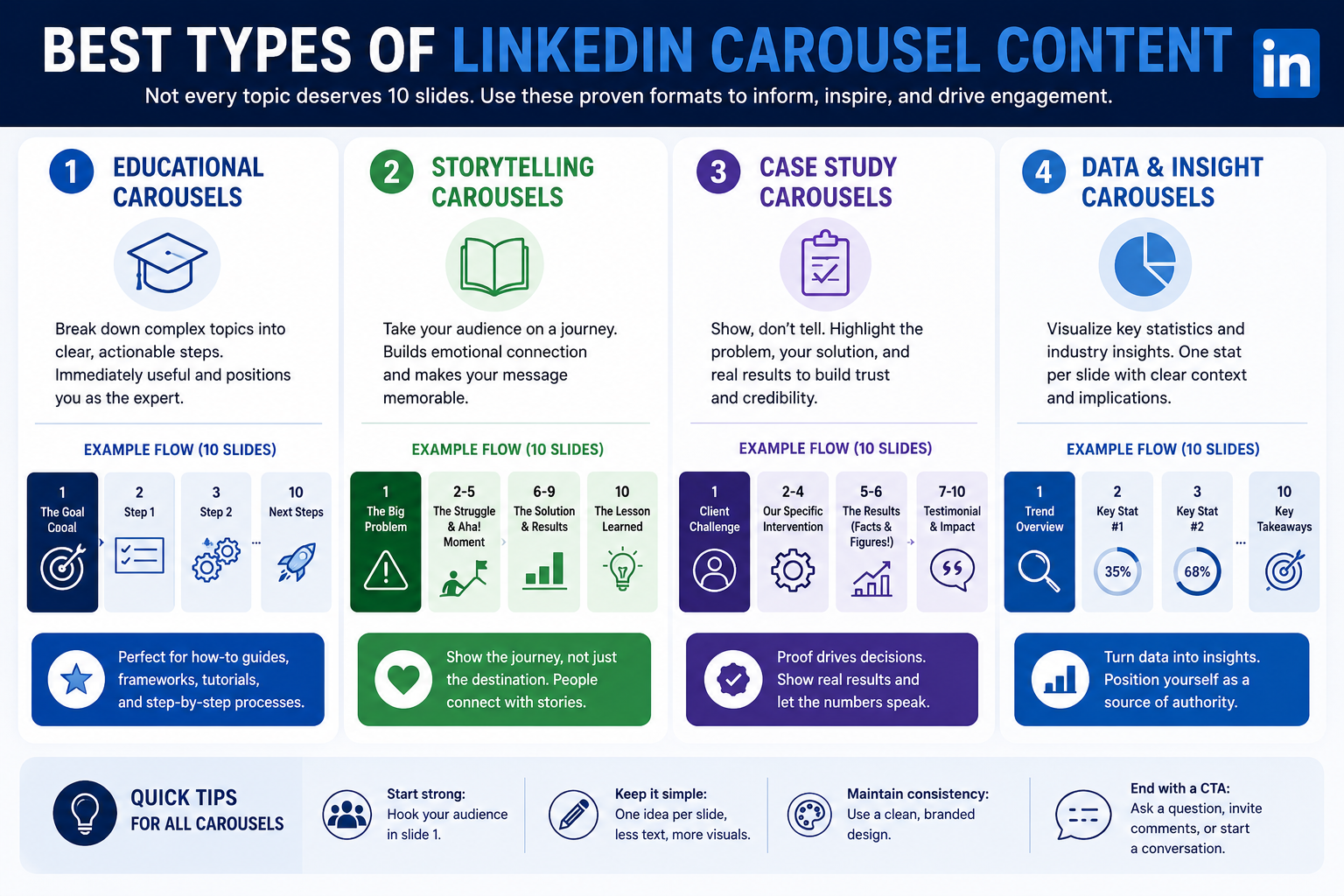
Not every topic deserves 10 slides. To maintain a high content performance, you should stick to formats that lend themselves to a visual “unfolding.”
1. Educational Carousels
These are the workhorses of LinkedIn. You take a complex process—like “How to Set Up GA4 Key Events”—and break it down into one step per slide. Educational content works because it’s immediately useful. It positions you as the expert without being “salesy.”
2. Storytelling Carousels
People buy from people. Use a carousel to tell the “Hero’s Journey” of your business.
1. Slide 1: The big problem.
2. Slides 2-5: The struggle and the “aha!” moment.
3. Slides 6-9: The solution and the results.
4. Slide 10: The lesson learned. This builds thought leadership and emotional resonance that a simple text post can’t touch.
3. Case Study Carousels
For B2B marketing, proof is everything. Instead of a boring PDF link, create a carousel that shows:
1. The Client’s Challenge.
2. Your Specific Intervention.
3. A Screenshot of the Results (Facts and figures!).
4. A Testimonial Quote.
4. Data & Insight Carousels
Take a recent industry report (like the 2026 B2B Trends Report) and visualize the most shocking statistics. Use one slide per “stat” with a brief explanation of what it means for your audience. This builds professional branding through curated authority.
How to Create LinkedIn Carousel Posts
You don’t need a degree in Graphic Design to create a high-performing carousel. You just need a process.
1. Define the Goal: Are you trying to get newsletter signups, or do you just want to build brand awareness?
2. Write the Script First: Do not start with design. Write your “Slide 1 to Slide 10” outline in a Google Doc.
3. The 50/50 Rule: 50% of your effort should go into the first slide. It needs a bold headline, a clear promise of value, and a high-contrast visual.
4. Keep Text Minimal: No more than 30–50 words per slide. If a slide looks like a page from a book, the user will “bounce.”
5. Design for Mobile: Over 80% of LinkedIn users are on mobile devices. Ensure your fonts are large (at least 24pt) and your colors are high-contrast.
LinkedIn Carousel Design Best Practices
A linkedin carousel design should be “invisible”—it should facilitate reading, not distract from it.
1. Consistency is Key: Use the same 2-3 fonts and your brand colors throughout. This builds content visibility; eventually, people will recognize your carousel before they even see your name.
2. Slide Hierarchy: Use “Breadcrumbs.” Add a small indicator at the bottom (e.g., “Slide 3 of 8”) or a progress bar. This gamifies the experience and encourages the user to reach the end.
3. The “Double CTA”: Add a small “Follow for more” on every slide, and a “Big CTA” (Link in bio, comment below) on the final slide.
4. Accessibility: Use high-contrast color schemes (e.g., black text on a white or light gray background) to ensure users with visual impairments can engage with your content.
For those looking for professional templates or inspiration, Canva’s LinkedIn Collection remains the gold standard for creator-friendly design in 2026.
Common Mistakes in LinkedIn Carousel Strategy
Even the best creators fall into these traps. Avoid them to keep your engagement rate high:
1. The “Wall of Death”: Putting too much information on one slide. If they have to squint, they’ll swipe… but they’ll swipe away.
2. No Story Arc: Random tips that don’t connect. A carousel should feel like a book, with a beginning, middle, and end.
3. Weak Hook: Headlines like “My Thoughts on Marketing” will die in obscurity. Use “How We Generated 400 Leads in 10 Days” instead.
4. Ignoring the Caption: Your LinkedIn post caption should complement the carousel, not repeat it. Use the caption to ask a question and drive people into the comments.
Best Practices to Increase LinkedIn Carousel Engagement
To truly master social media engagement, you need to treat the carousel as the start of a conversation, not the end of one.
1. Create Curiosity: End Slide 1 with a cliffhanger like “But there’s one catch…” to force the swipe.
2. Actionable Takeaways: Every slide should provide a “mini-win.” By the time the user reaches the end, they should feel smarter than when they started.
3. Encourage Saves: Explicitly tell people: “Save this for your next strategy meeting.” As mentioned, saves are a powerful ranking signal.
4. The First Hour Rule: Respond to every comment within the first 60 minutes of posting. This tells the algorithm that the post is generating a “meaningful conversation,” which triggers a wider reach.
LinkedIn Carousel Strategy for B2B Brands
For B2B marketing, carousels are the most efficient way to demonstrate expertise without the friction of a “Lead Gen Form” or a website click.
In 2026, many enterprise companies are using carousels for Account-Based Marketing (ABM). They create carousels specifically tailored to the problems of a single target company and then “tag” or share them with decision-makers at that firm. It’s high-touch, high-value, and incredibly effective for personal branding at the executive level.
Carousels also act as a “Sales Enablement” tool. Your sales team can send a carousel link to a prospect to explain a technical feature, providing a much more engaging experience than a static one-pager.
Final Thoughts
The linkedin carousel strategy is not a “growth hack”—it is a commitment to providing value in the format that users prefer. By combining high-quality educational content with clean linkedin carousel design, you can build a level of trust and authority that standard posts simply can’t achieve.
Success in 2026 depends on your ability to be a “Visual Teacher.” Stop trying to sell in every post, and start trying to solve a problem in every slide. When you provide value consistently, the leads and the growth will follow naturally.
Ready to transform your LinkedIn presence from a quiet resume to a lead-generating powerhouse? At Digitally Bugged, we specialize in helping B2B brands navigate the complexities of modern content strategy. Contact us today to start building a custom LinkedIn roadmap that actually moves the needle.
FAQ Section
1. What are LinkedIn carousel posts?
They are swipeable, multi-slide posts created by uploading a PDF document. They allow for a more interactive and visual way to share information directly in the LinkedIn feed.
2. Why do LinkedIn carousel posts perform well?
They increase dwell time, which is a primary metric for the linkedin algorithm. Because users spend more time swiping through slides, the platform views the content as high-quality and expands its reach.
3. How do you create LinkedIn carousel posts?
Create a multi-page design (usually 1080×1080 or 1080×1350 pixels) in a tool like Canva or Illustrator. Save it as a PDF and upload it to LinkedIn using the “Add a document” icon in the post composer.
4. Are LinkedIn carousel posts good for B2B marketing?
Yes. They are perfect for simplifying complex B2B topics, sharing case studies, and establishing thought leadership in a format that is easy for busy professionals to consume on the go.
5. What content works best for LinkedIn carousels?
Step-by-step guides, “Before and After” case studies, industry statistics, and storytelling-driven personal branding posts are the highest-performing formats.
6. How can businesses improve LinkedIn carousel engagement?
Focus on a high-impact first slide, use minimal text, ensure the design is mobile-friendly, and always end with a clear, actionable call to action. Respond to comments quickly to boost the initial engagement signals.