

What Is a LinkedIn Content Calendar?
A LinkedIn content calendar is a structured plan that helps you organize what you are posting on LinkedIn, when you are posting it, and why. Instead of deciding content on the same day, you map ideas in advance and create a repeatable system. In simple terms, a content calendar for LinkedIn helps bring consistency to your posting efforts.
For B2B brands, this matters a lot because LinkedIn content is rarely about one viral post. It works through repetition, credibility, and staying visible over time.
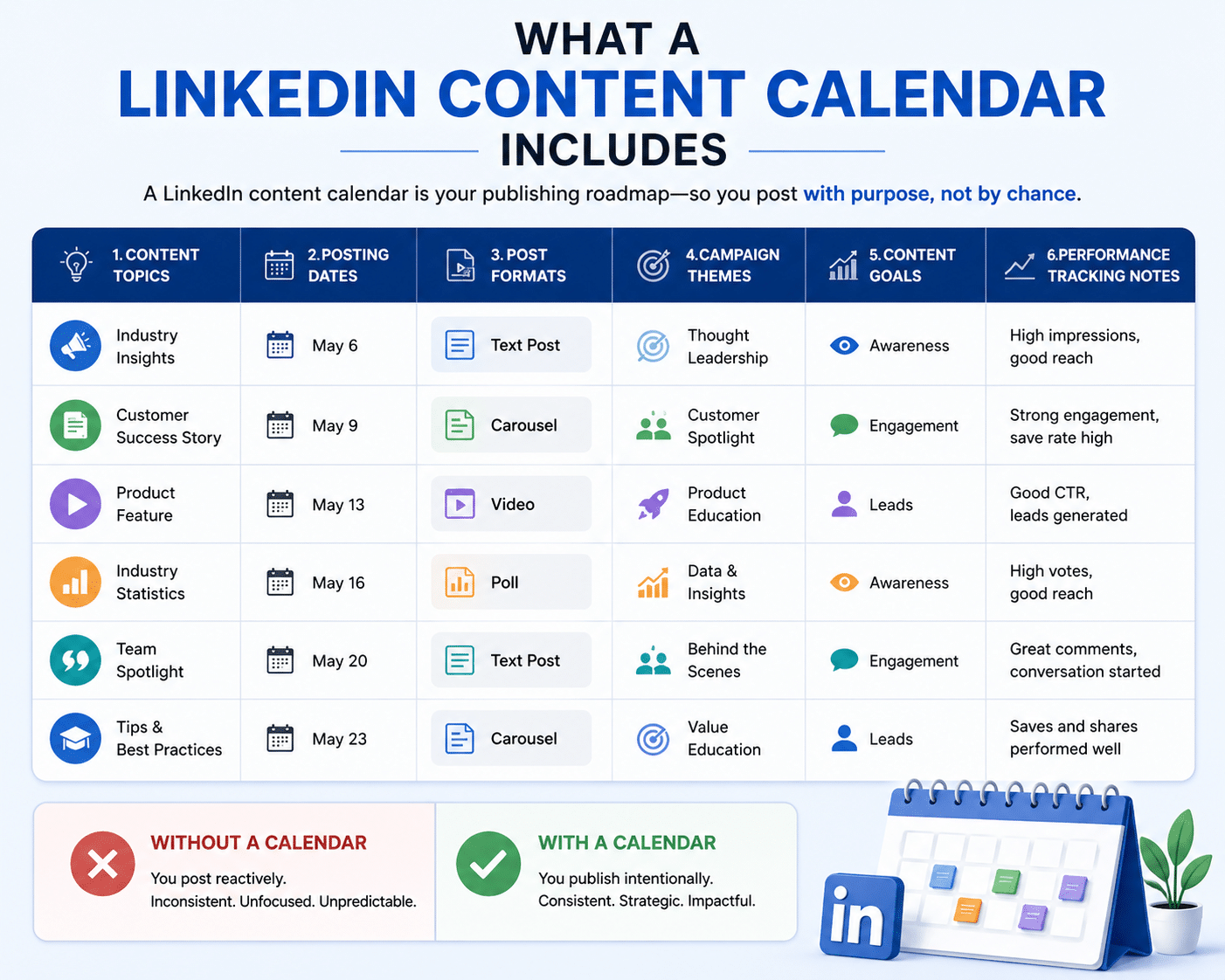
What does a LinkedIn content calendar includes?
A linkedin social media calendar usually includes:
1. Content topics
2. Posting dates
3. Post formats (text, carousel, video, polls)
4. Campaign themes
5. Content goals (awareness, engagement, leads)
6. Performance tracking notes
Think of it as less of a spreadsheet and more of a publishing roadmap. Without one, most brands post reactively. With one, they publish intentionally.
Why B2B brands need a content calendar?
B2B buying cycles are long. Trust takes time & that means random posting does not work
A content calendar helps B2B brands:
1. Stay consistent
2. Build authority gradually
3. Align content with business goals
4. Support demand generation
5. Reduce last-minute content stress
It turns LinkedIn from “something we should post on” into a channel with strategy.
Why a LinkedIn Content Calendar Is Important for B2B?
A lot of brands struggle on LinkedIn not because content is bad, but because there is no system behind it and that is where linkedin content strategy b2b starts.
How consistency impacts LinkedIn growth?
Consistency is often underrated. People rarely trust a brand because of one post. They trust brands they keep seeing.
Consistent publishing improves:
1. Reach
2. Recall
3. Engagement
4. Authority
5. Inbound opportunities
That is why b2b linkedin content planning matters. It helps you show up regularly without scrambling for ideas.
Role of content planning in lead generation
Content planning is not just about engagement; it also supports pipeline.
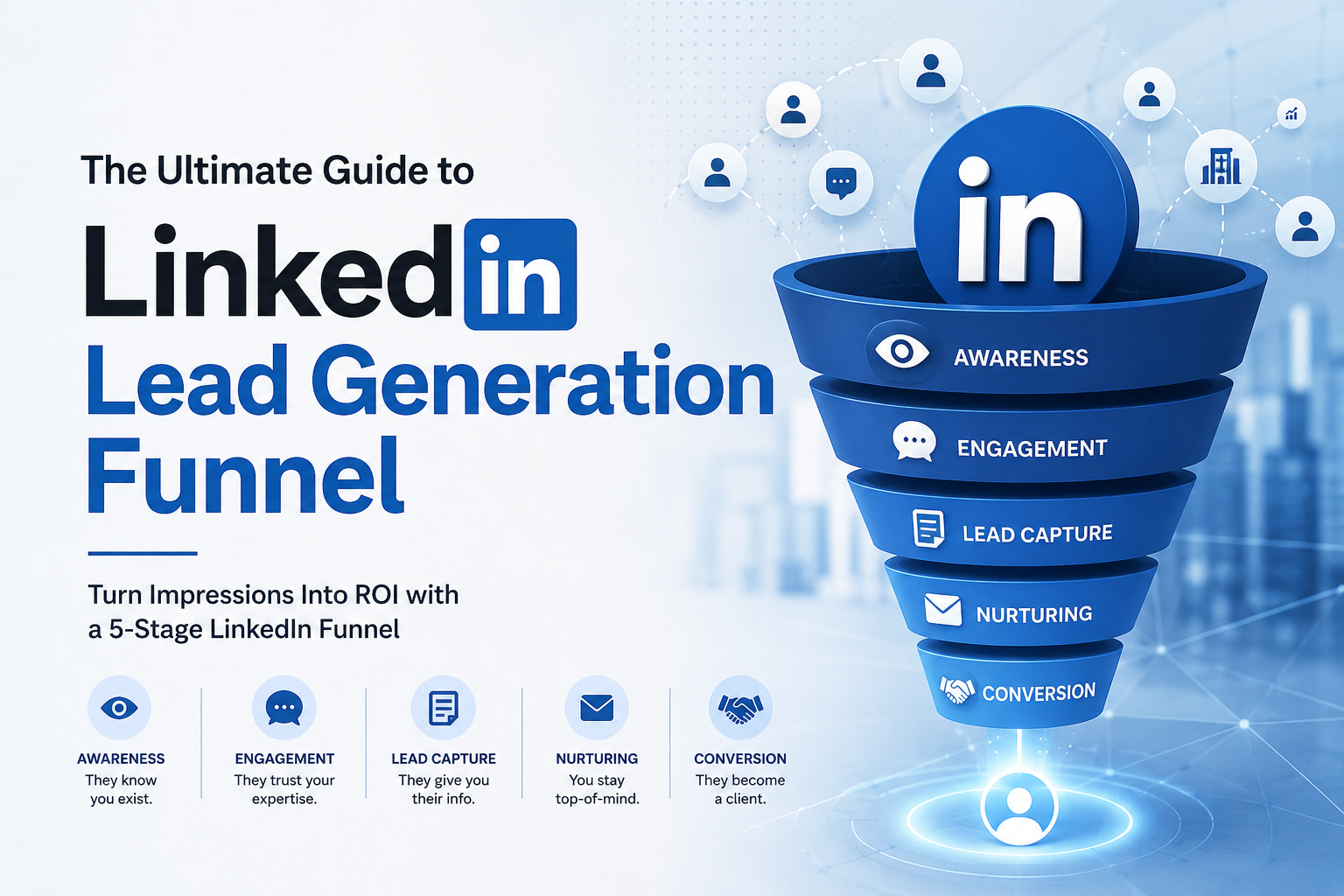
A good LinkedIn strategy creates a journey: Awareness → Trust → Interest → Conversation.
That is where content starts supporting lead generation instead of just impressions.
Types of LinkedIn Content You Should Include
A strong calendar needs variety. If every post looks the same, engagement drops.
Here are content types worth including.
1. Educational content: This is often the backbone of good B2B content.
Examples:
1. Industry explainers
2.Frameworks
3. How-to posts
4. Lessons from experience
5. Myth vs reality posts
These work well as linkedin post ideas for b2b because they build trust fast.
2. Thought leadership content: This is where your point of view matters- not reporting trends but interpreting them
Examples:
1. Industry opinions
2. Predictions
3. Contrarian takes
4. Founder perspectives
5. Trend breakdowns
Good thought leadership separates brands from competitors and it is a big part of b2b content ideas linkedin strategies.
3. Lead generation content: Not every post should sell but some content should move people toward action
Examples:
1. Case studies
2. Client wins
3. Problem-solution posts
4. Use cases
5. Offers tied to pain points
This is where linkedin content ideas 2026 are moving – less vanity, more business relevance.
4. Engagement-driven posts: Some content exists to start conversations
Examples:
1. Polls
2. Hot takes
3. “Agree or disagree?” posts
4. Industry debates
5. Question-led posts
These help improve reach and feed your linkedin engagement strategy.
How to Plan a 30-Day LinkedIn Content Calendar
This is where most people overcomplicate things. You do not need a massive system; you need a repeatable one. Here’s exactly how to build a LinkedIn content calendar that works month after month.
Step 1: Define your goals
Before you write a single post, decide what outcome you’re after. Your LinkedIn posting strategy should follow your business objective; not the other way around.
1. Brand awareness
2. Lead generation
3. Thought leadership
4. Community growth
A brand-focused calendar looks very different from a lead-gen calendar. Get clear on the goal before you plan the content.
Step 2: Choose 3–5 recurring content themes
Don’t invent 30 fresh ideas from scratch. Choose a small set of themes and rotate through them. This is what makes monthly content planning on LinkedIn actually sustainable.
Example:
1. Industry insights
2. Customer pain points
3. Case studies
4. Founder voice
5. Educational content
Step 3: Allocate post types across the month
Now allocate your 30 posts with intention. Here’s a practical social media content planning structure for LinkedIn:
1. 8 educational posts
2. 6 thought leadership posts
3. 6 engagement posts
4. 4 case studies
5. 4 lead-gen posts
6. 2 culture or human posts
Step 4: Balance value vs promotion
The biggest mistake brands make on LinkedIn is over-promoting. A healthier split protects your audience’s trust and actually drives more conversions.
30-Day LinkedIn Content Calendar Template
A good LinkedIn content calendar template doesn’t try to do everything at once. It thinks in weekly arcs – each week has a dominant purpose that builds on the last.
Week 1 Awareness
1. Industry trend post
2. Educational carousel
3. Founder opinion post
Week 2 Authority
1. Framework post
2. Case study
3. Myth-busting post
Week 3 Engagement
1. Poll
2. Discussion-led post
3. Contrarian viewpoint
Week 4 Lead Generation
1. Problem-solution post
2. Client result post
3. Soft CTA post
This basic linkedin content calendar example covers visibility, trust, and demand.
How to Customize the Template?
Templates should guide strategy; not replace it. Adjust based on your sales cycle, audience maturity, industry, and content bandwidth. Not every brand needs the same calendar. Use this as a starting point and tune from there.
Best Posting Schedule for LinkedIn in 2026
Timing matters but not as much as people think. Generally, best time to post on LinkedIn tends to be:
Best Days: Tuesday–Thursday
Morning Window: 8–10 AM
Afternoon Peaks: 12 PM- 5 PM
But here’s the truth: audience matters more than generic benchmarks. Test your own data.
How often should you post?
A practical linkedin posting schedule for B2B:
3–5 posts weekly; Enough for consistency without quality dropping
Consistency beats timing: A mediocre post published consistently often beats a great post published randomly. Timing can help reach; consistency builds brand. Big difference.
How to Optimize Your Content for Engagement
Publishing is only half the game. Performance depends on how content is written.
1. Writing hooks that increase engagement: The first line of every post determines whether anyone reads the rest. Strong hooks create pattern interrupts. They drive curiosity. Curiosity drives dwell time which signals LinkedIn’s algorithm to distribute further.
Examples:
1. Most B2B brands get LinkedIn wrong.
2. We stopped doing X and pipeline improved.
3. Unpopular opinion…
2. Encouraging comments and discussions: Don’t end posts flat. A strong engagement strategy on LinkedIn includes prompts that invite a response. Simple endings like “What would you add?” or “Agree or disagree?” consistently move the needle.
3. Track the metrics that actually matter: Vanity likes mean very little. Track what moves your business: Impressions, Saves, Comments, Profile visits, Inbound leads. These are basic linkedin content performance tips many brands ignore.
Using LinkedIn Content for Lead Generation
This is where content connects to revenue; not just attention. Your LinkedIn editorial calendar should have a clear pathway from content to pipeline.
1. How content become leads: Content builds trust first. Leads follow. Use your posts to surface the problems your service solves and let that act as the foundation of your B2B LinkedIn content strategy. The audience self-selects into leads when the content is relevant enough.
Strong converting formats:
1. Case studies
2. Problem breakdowns
3. Framework posts
4. Client stories
5. Comparison posts
These work well for b2b lead generation linkedin content.
2. CTA strategies for B2B: Not every CTA should say “book a call.” Use softer CTAs:
1. Want the framework? Comment below.
2. Message me for the checklist.
3. Curious how this applies to your business?
Less friction and better response
Common Mistakes to Avoid in LinkedIn Content Planning
1. Posting without strategy: Random posting is not strategy; it is activity. Different thing.
2. Over-promotional content: If every post sounds like sales copy, engagement dies. Value has to lead.
3. Ignoring analytics: If you never review what performs, your linkedin posting strategy stays guesswork. Measure. Adjust. Repeat.
Tools to Create and Manage Your LinkedIn Content Calendar
You do not need complicated software; Simple tools will work. Some of the useful options:
1. Notion
2. Google Sheets
3. Trello
4. Asana
5. Buffer
6. Hootsuite
Even a spreadsheet can work as a linkedin editorial calendar because your system matters more than software
How to manage content efficiently
Batch content, Plan monthly, Draft weekly and Repurpose top-performing posts That alone cuts effort massively.
Final Checklist for Your LinkedIn Content Calendar
Before finalizing your linkedin content calendar, check:
✔ Clear goals
✔ 3–5 content themes
✔ Mix of authority + engagement + lead-gen content
✔ Posting schedule defined
✔ CTAs planned
✔ Metrics tracked
Do’s and Don’ts
Do:
1. Plan ahead
2. Post consistently
3. Prioritize value
4. Use content to build trust
Don’ts
1. Post randomly
2. Over-promote
3. Ignore analytics
4. Treat LinkedIn like every other social platform
A strong linkedin content calendar is not about posting more; it is about posting with intent and that is what drives B2B growth
Frequently Asked Questions (FAQs)
1. How long does it take to see actual ROI from a LinkedIn content calendar?
In the B2B world, patience is a requirement, not a suggestion. While you might see a spike in engagement (likes/comments) within the first 30 days, actual lead generation typically takes 3 to 6 months of consistent posting. Content compounds; you’re building a library of authority that prospects will binge-read before they ever hop on a discovery call.
2. Should I focus this calendar on my Company Page or my Personal Profile?
If you have to choose, prioritize personal profiles. In 2026, the LinkedIn algorithm—and human nature—heavily favors people over logos. Use the calendar to turn your executives or subject matter experts into thought leaders. You can then repurpose those high-performing “human” posts into more formal updates for your Company Page.
3. Is it okay to use AI to write my 30 days of content?
AI is a fantastic co-pilot, but a terrible solo driver. Use it to brainstorm hooks, outline your “Educational” posts, or summarize long-form whitepapers. However, for “Thought Leadership” and “Founder Perspectives,” your audience can sniff out generic AI text a mile away. Use AI to save time on the structure, but keep the “point of view” strictly human.
4. What should I do if a trending topic breaks and ruins my scheduled plan?
Pivot. A content calendar is a roadmap, not a prison sentence. If a major industry shift or news story breaks, feel free to pause your scheduled post for the day and share a “Hot Take.” A good strategy is 80% planned and 20% reactive. This keeps your brand looking relevant and “awake” to current events.
5. Do I really need expensive scheduling software to make this work?
Not at all. While tools like Buffer or Hootsuite are great for automation, a simple Notion board or Google Sheet is often more effective for the planning phase. The “magic” isn’t in the software you use to click ‘publish’; it’s in the strategic mix of themes and the consistency of your message.